Ubuntu 26.04 is the latest Long-Term Support release of Ubuntu, codenamed Resolute Raccoon. It brings new features and a few changes if you’re coming from Ubuntu 24.04. In this article, you’ll learn what the new features are, what the changes are, basic info like release date, and more.
Ubuntu 26.04 Release Date
The release date of Ubuntu 26.04 is April 23, 2026. Ubuntu’s LTS versions are always released in April every 2 years. So the release date is in the 04th month of the year 2026, which is where 26.04 comes from.
This is the exact release schedule of Ubuntu 26.04:
- Feature Freeze: February 16th, 2026 (stopped introducing new features)
- User Interface Freeze: March 12th, 2026 (no more changes to the UI)
- Beta Release: March 23rd, 2026 (you’ll get it now if you’ve opted for beta versions)
- Final Freeze: April 16th, 2026 (only bug-fix updates are allowed at this point)
- Final Release: April 23rd, 2026
You’ll get 15+ years of support for this release. This means, the end of life (EOL) is:
- Standard security maintenance: April 2031.
- Expanded security maintenance and break/bug support (with Ubuntu Pro): April 2036.
- Legacy add on for security maintenance and support (with Ubuntu Pro): April 2041.
Ubuntu 26.04’s Codename: Resolute Raccoon
As always, the codename of Ubuntu is 2 words – an adjective and an animal starting with the same letter. This codename is used throughout the distro, including backgrounds, packages, documentation, and more. The codename was chosen by Vorlon (Steve Langasek, RIP).
A raccoon is a clever and adaptable problem-solver. A symbol of resilience, persistence, and creativity. The “Resolute” adjective describes the animal’s tenacity, but both words together describe the FOSS mindset: pushing forward, adapting, and creatively solving problems. A perfect fit for the new release of Ubuntu.
What’s New in Ubuntu 26.04
Ubuntu 26.04 ships with GNOME 50, so all major changes and updates in GNOME 50 will apply to Ubuntu 26.04 as well.
Here’s everything that’s new in Ubuntu 26.04:
A new default media player
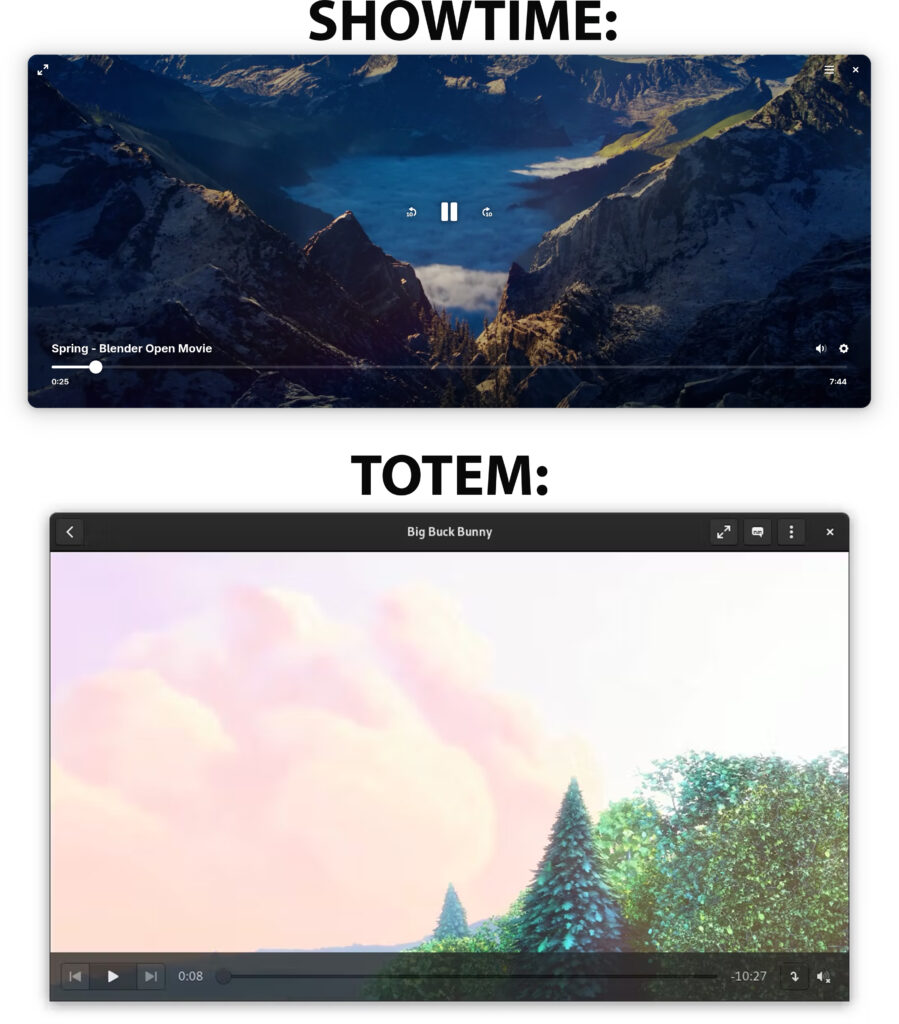
Ubuntu 26.04 replaced Totem with a new media player – Showtime. This is a welcomed update as Showtime will fit naturally within the desktop environment and looks more modern. They’ve been using Totem since 2004, although it’s not a bad choice, Showtime will provide a more modern feel and look.
Here is a visual comparison of Showtime and Totem:
New System Monitor
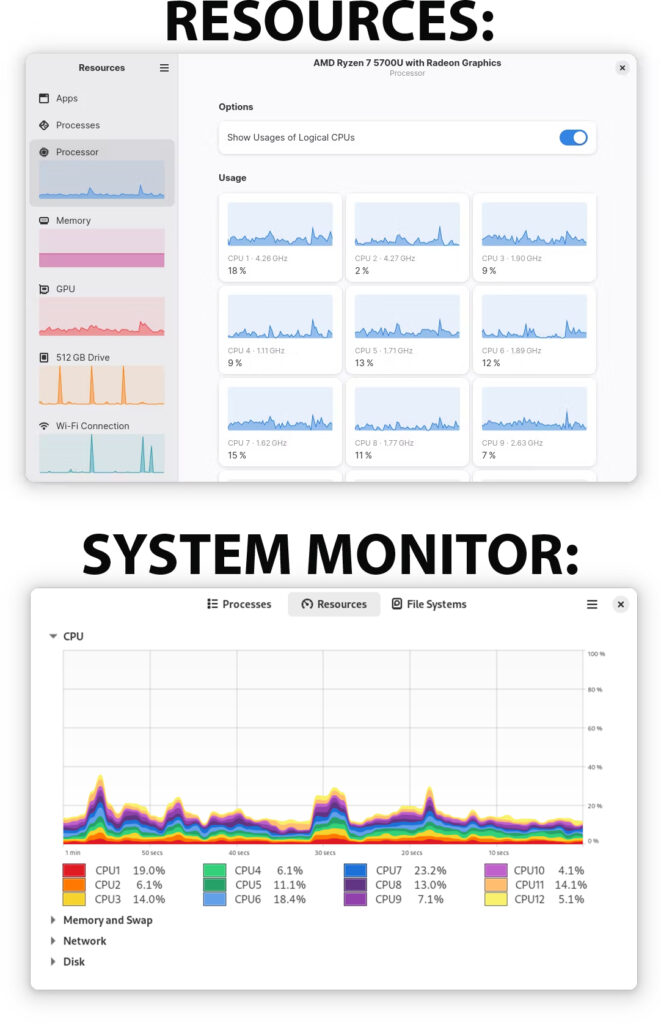
The old, trusty “Task Manager” of Ubuntu – “System Monitor” will be replaced with a newer, sleeker, more modern app – “Resources”.
Here’s a visual comparison of Resources and System Monitor:
Ubuntu Insights is the new data-gathering app
Telemetry in Ubuntu is optional. The previous Ubuntu Report tool is being replaced by Ubuntu Insights, with one key change: instead of sending a one-time snapshot after opt-in, it will submit anonymized system data on a monthly basis. Users who previously opted in on Ubuntu 24.04 LTS will be asked to confirm their consent again when upgrading to Ubuntu 26.04 LTS.
Again, it’s optional, and will happen only if you opt-in. Everything is open-sourced, even the server backend. Everything is anonymized. The only change, again, is that it will automatically send monthly data (with a warning a week before)
Linux 7.0 is the kernel Ubuntu 26.04 uses
So you’ll be getting the latest hardware support and performance improvements.
“Software & Updates” is removed
The reasoning behind this is it being too risky for beginners to have GUI access to disabling access to the main Ubuntu repos. You can still install it back, it’s always available in the repos. You can still update your system via the CLI, or use the Settings option or App Center if you want to use the GUI.
Asterisks when you type your sudo password
A common issue with beginners. In older Ubuntus, when you type in your sudo password, you’re not seeing anything happen. Starting with 26.04, when you type in your password, you’ll see asterisks *****.
Web search and Snap search in the Overview
When you use the Shell Overview (Windows/Super button), you’ll have an option to do a Web Search and a Snap search.
For web search, it will use the new extension “Web Search Provider”. Data is not being sent anywhere until you actually search for something (hit Enter). It will search for whatever you typed in Google with your default web browser.
The keywords you type will also search the Canonical Snap Store for matching apps that you don’t have installed.
New folder icons
The new folder (directory) icons will be more colorful, as compared to the previous gray-ish colors. Even apps from the LibreOffice suite will have updated icons. So this will be a major visual update if you’re used to the old icons.
Other news in Ubuntu 26.04
- AMD’s ROCm is added to the 26.04 repos, making it easier to install, same as NVIDIA’s CUDA.
- Ubuntu 26.04 will ship with OpenJDK 25 (instead of OpenJDK 21)
- No more translucent dock.
- A new boot animation (spinner with the theme of the mascot)
- Wayland-only GNOME session. The X11 GNOME session is gone. XWayland is still included for apps that need it, but if you rely on a full X11 session, consider a flavor like Xubuntu or Kubuntu instead.
- Better Wayland support for NVIDIA users. The Wayland session experience on NVIDIA hardware has been significantly improved.
- Rust-based core utilities. Several core system tools are being rewritten in Rust, improving memory safety across the system.
- TPM-backed full disk encryption. A new option during installation lets you tie full disk encryption to your device’s TPM chip, making it more seamless and secure.
- Post-quantum cryptography enabled by default. Ubuntu 26.04 ships with post-quantum cryptographic algorithms out of the box, future-proofing security for users who need it.
What’s new in GNOME 50
Ubuntu 26.04 ships with GNOME 50 (codenamed “Tokyo”). If you’re coming from Ubuntu 24.04, you were on GNOME 46 – so you’re skipping four major versions. Here’s what’s changed:
Display & Graphics
- Variable Refresh Rate on by default – your monitor now syncs its refresh rate to whatever is on screen, resulting in smoother visuals and no screen tearing, no setup needed.
- Fractional scaling on by default – you can now pick display scales like 125% or 150% natively, instead of being stuck jumping between 100% and 200%.
- Low-latency cursor under VRR – your mouse cursor stays smooth and responsive even when the app behind it is struggling with frame rate.
- HDR and color management improvements – better support for high-end monitors, plus HDR screen sharing now works.
- XWayland scaling toggle – a new option in Display settings scales legacy X11 apps to match your Wayland scale factor. Older apps may look slightly soft, but at least they won’t be tiny.
Shell & Interface
- Hardware-accelerated remote desktop – remote sessions now tap into Vulkan and VA-API for a noticeably smoother experience, with lower latency and less battery drain.
- Headless remote sessions – you can now start a remote desktop session on a machine with no monitor plugged in, without jumping through hoops.
Files (Nautilus)
- Major performance and usability overhaul – the Files app is snappier, batch renaming highlights editable parts of filenames, file properties open as floating windows, and the path bar now does case-insensitive completion.
- Multi-filter search – you can apply more than one file type filter at once when searching. Small thing, big quality of life improvement.
Document Viewer (Papers)
- Annotation tools – you can now draw, highlight, and add text notes directly in Papers, with color and thickness controls and an eraser. In other words, “PDF form filling.” This was barely functional in previous GNOME versions.
Parental Controls
- Screen time limits and bedtime schedules – parents can set daily time limits per child account. When the limit is up, the screen locks, and a parent can grant extra time without logging out.
Calendar
- Attendee lists – you can now see who’s invited to a calendar event and whether their attendance is required. It’s a step toward proper meeting management within GNOME.
- Redesigned Quick Add – creating events on the fly is more intuitive with a refreshed popover interface.
Accessibility
- Orca screen reader redesign – Orca got a new preferences window, global settings, automatic language switching, and better Braille and document navigation support.
New Apps
- Gradia – a lightweight screenshot annotation tool for marking up and polishing screenshots.
- Constrict – a simple video compression app.
- Sessions – a Pomodoro-style focus timer.
Ubuntu 26.04 LTS Flavors
Don’t like GNOME? You don’t have to use it. Ubuntu has a family of official flavors – they all run the same Ubuntu 26.04 base under the hood, with the same kernel, the same repos, and the same LTS support, just with a different desktop environment pre-installed. Here are the official flavors available for Ubuntu 26.04:
- Kubuntu – uses the KDE Plasma desktop. A great choice if you want a more Windows-like layout, heavy customization options, or if you need a full X11 session (KDE still supports it).
- Xubuntu – uses the XFCE desktop. Lightweight, snappy, and ideal for older hardware.
- Lubuntu – uses the LXQt desktop. Even lighter than Xubuntu, built for very low-spec machines.
- Ubuntu Budgie – uses the Budgie desktop. Clean, modern, and a nice middle ground between GNOME and something more traditional.
- Ubuntu Studio – tailored for creative professionals. Ships with a real-time kernel and a large collection of audio, video, and graphics tools pre-installed.
- Ubuntu Kylin – the official flavor built for Chinese-speaking users, with a localized interface and region-specific apps.
- Edubuntu – designed for schools and educational environments, with a curated set of learning apps pre-installed.
All flavors are free to download from ubuntu.com/desktop/flavors. If you’re unsure which to pick, Kubuntu is the most popular alternative to the default Ubuntu, and Xubuntu is the go-to for older machines.
Ubuntu 26.04 LTS Server
Ubuntu 26.04 LTS isn’t just for desktops – the server edition is a first-class release and arguably where LTS support matters most. Canonical’s enterprise and cloud customers overwhelmingly run Ubuntu Server, and 26.04 brings a number of improvements relevant to that audience.
What’s notable for server users:
- 15+ years of support – with Ubuntu Pro, Ubuntu 26.04 Server is supported until 2041. For production environments, that’s a major selling point over non-LTS releases.
- Post-quantum cryptography by default – critical for organizations planning long-term data security. Encrypted data captured today could be decrypted by quantum computers in the future, so this matters more than it might seem right now.
- TPM-backed full disk encryption – easier to deploy encrypted servers, especially relevant for edge deployments and bare-metal installations.
- Rust-based core utilities – memory-safe rewrites of core system tools reduce attack surface on servers where stability and security are non-negotiable.
- Linux kernel 7.0 – better support for modern server hardware, including AMD Zen 6 and Intel Nova Lake processors.
- Toolchain updates – glibc 2.42, LLVM 21, Rust 1.93.1, and OpenJDK 25 are all available, making 26.04 a solid base for development and CI environments.
- OpenStack and cloud – Ubuntu 26.04 will be fully supported on AWS, Azure, Google Cloud, and Oracle Cloud on launch day, as with every LTS release.
Ubuntu Server 26.04 has no desktop environment installed by default, which keeps it lean. You can install one later if needed, or manage everything over SSH as usual. You can grab the server ISO separately from the desktop version at ubuntu.com/download/server.
Ubuntu 26.04 vs 24.04: What’s Changed
If you’re currently on Ubuntu 24.04 and wondering whether it’s worth upgrading, here’s a direct comparison of what’s different.
Desktop Environment
24.04 shipped with GNOME 46. 26.04 ships with GNOME 50 – four major versions ahead. That means VRR on by default, fractional scaling out of the box, a heavily improved Files app, better remote desktop, new parental controls, and much more. It’s a significant jump.
Display Server
This is the biggest breaking change. Ubuntu 24.04 still offered an X11 GNOME session as an option at the login screen. Ubuntu 26.04 drops it entirely — Wayland is now the only GNOME session. XWayland is still present for legacy app compatibility, but if you specifically needed a full X11 session, you’ll need to switch to a flavor like Xubuntu or Kubuntu.
Linux Kernel
24.04 shipped with kernel 6.8. 26.04 ships with kernel 7.0, bringing support for newer hardware including Intel Nova Lake, AMD Zen 6, and early Qualcomm Snapdragon X2 support.
Default Apps
The new video player and new system monitor apps won’t be changed for you. The old defaults will remain installed and will remain the default choices. However, the new apps will be installed alongside the old ones.
If you’re upgrading from 24.04 and you have Software & Updates installed, it will still be installed for you in 26.04.
Security
26.04 introduces TPM-backed full disk encryption, post-quantum cryptography enabled by default, and Rust-based core utilities – none of which were present in 24.04. It’s a meaningful step forward for security-conscious users.
GPU & Gaming
NVIDIA Wayland support has improved considerably between the two releases. AMD ROCm is now in the official repos in 26.04, whereas on 24.04 it required manual setup. VRR also works out of the box now, which matters for gamers.
Telemetry
Ubuntu Report in 24.04 sent a one-time data snapshot if you opted in. Ubuntu Insights in 26.04 sends anonymized data monthly – still opt-in, still open source, but worth knowing if you’re privacy-conscious.
Should you upgrade to Ubuntu 26.04 coming from Ubuntu 24.04?
If you’re on 24.04 and things are working fine, wait for 26.04.1 in July/August 2026 – it’ll have months of bug fixes rolled in and the upgrade path will be officially open. If you want the new features now, you can upgrade earlier using sudo do-release-upgrade -d, but expect the occasional rough edge.
Download Ubuntu 26.04
You can download the latest Ubuntu 26.04 LTS release (daily build) here. Or just use your system updater to update if 26.04 has already been released.
FAQs about Ubuntu 26.04
Here are some FAQs with answers about Ubuntu 26.04:
Should I upgrade to 26.04?
If 26.04.1 is released (around July/August), then yes, do it. If not, you’re better off waiting if you prefer real stability. You can still upgrade sooner if you prefer having all these new features.
How can I update to Ubuntu 26.04 if I’m using Ubuntu 24.04?
Just run these commands in the Terminal:
sudo apt-get update && sudo apt-get dist-upgrade -y
sudo do-release-upgrade
If Ubuntu 26.04.1 is released. If not, you’ll need to run:
sudo do-release-upgrade -d
We have detailed instructions here.
What does “LTS” mean in 26.04 LTS?
It means Long-Term Support. Which means that this release will be supported for 15+ years.
Can I still use X11 apps on Ubuntu 26.04?
Yes. While the X11 GNOME session is gone, XWayland is still included. Most X11 apps will run just fine through XWayland without you needing to do anything.
What are the minimum system requirements for Ubuntu 26.04?
You’ll need at least a 2 GHz dual-core processor, 6 GB of RAM, and 25 GB of storage. 4 GB of RAM is the absolute floor for installation, but you’ll want more for daily use.
Is Ubuntu 26.04 free?
Yes, completely. You can download and use it at no cost. Ubuntu Pro (for extended support) has a free tier for personal use covering up to 5 machines.
Is Ubuntu 26.04 stable?
Yes – as a Long-Term Support release, 26.04 goes through significantly more testing than a regular Ubuntu release before it ships. That said, no major OS release is completely bug-free on day one. If you need maximum stability, it’s worth waiting for Ubuntu 26.04.1 (expected July/August 2026), which bundles several months of post-release fixes into a single updated ISO. For servers and critical systems especially, 26.04.1 is the safer starting point.
What’s the difference between Ubuntu 26.04 and Ubuntu 26.04.1?
Ubuntu 26.04.1 is the first point release, expected in August 2026. It’s the same OS with several months of bug fixes and updates rolled in. It’s also when the official upgrade path from 24.04 opens up.
Can I try Ubuntu 26.04 without installing it?
Yes. When you boot from the Ubuntu ISO, you’ll get an option to “Try Ubuntu” before committing to an install. Everything runs live from the USB drive.
What desktop environment does Ubuntu 26.04 use?
Ubuntu’s default flavor uses GNOME 50. If you prefer a different desktop environment, there are official Ubuntu flavors — like Kubuntu (KDE), Xubuntu (XFCE), and others — that ship the same Ubuntu base with a different desktop.
Is Ubuntu 26.04 good for gaming?
It’s the best Ubuntu yet for gaming. The move to Wayland-only brings VRR and low-latency cursor support, NVIDIA Wayland compatibility is much improved, and AMD ROCm is now in the repos. Steam and Proton work as they always have.